In this article
The TV at home runs on a Xiaomi TV Box S (3rd gen) with Google TV 14. The hardware is fine. The software is the problem.
The home screen is full of things nobody asked for: sponsored rows, "New Episode" banners from services we don't even pay for, a Xiaomi TV+ tile, and apps that install themselves. Everything we actually watch is squeezed into one small row near the top, with a pile of content we never chose underneath it.
And there was a second problem. The kids watch on the main profile, and Family Link and YouTube Kids didn't hold them for long (kids these days, I tell you). I wanted to know what was on and for how long. And I wanted the TV to stop at bedtime without me walking over and taking the remote.
So this week I opened Claude Code and started working on the TV.
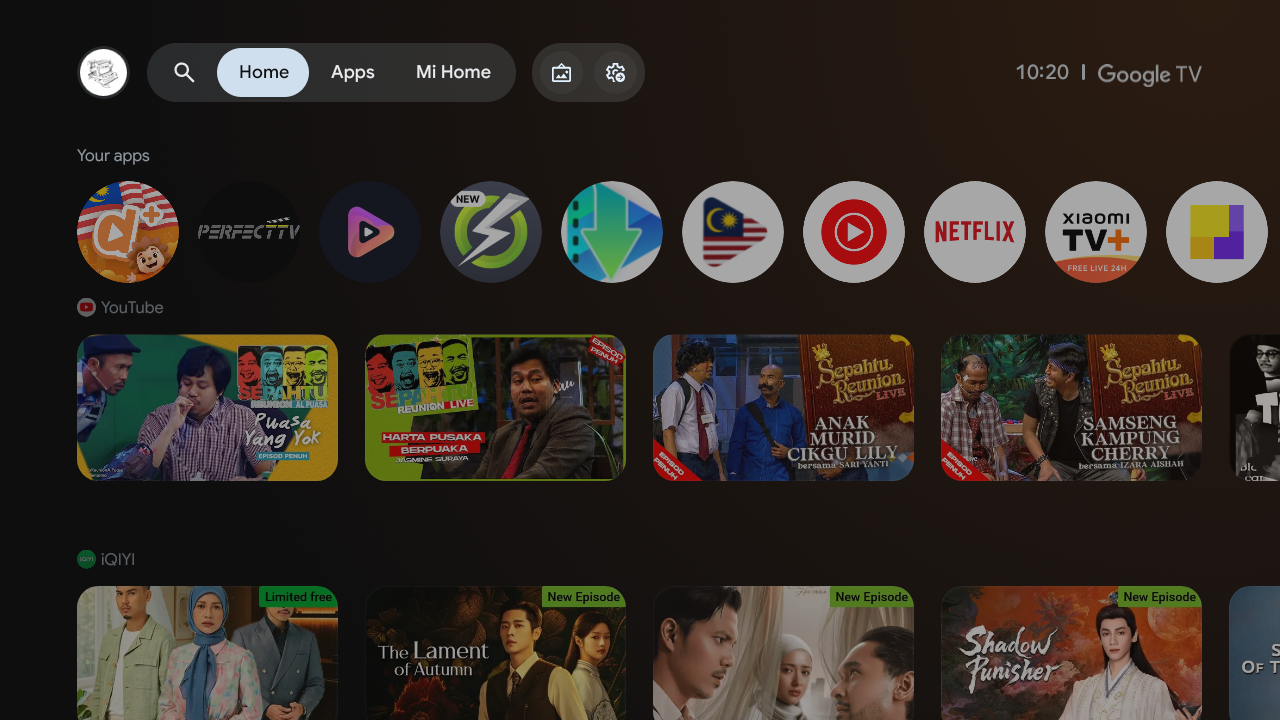 Stock Google TV home. The apps we use are in that one row at the top.
Part 1: CleanYourTV, someone else's good idea
I didn't start from scratch. A few days earlier, a developer called Gathin posted that they had "vibe coded" their parents' Xiaomi TV. They gave Claude Code the model number, it found the TV on Wi-Fi, disabled 25 Xiaomi packages, and wrote a new launcher that looks like an Apple TV. That became CleanYourTV. It's open source and MIT licensed, and the community has already added debloat lists for over 90 TV models.
GitHub repositoryGathin23 / cleanyourtvDebloat any Android or Google TV over Wi-Fi and get an Apple TV-style home.The idea is simple, and that's why it works. An Android TV has the same debug bridge (ADB) as an Android phone. Turn on developer options, allow your PC once, and you can use the normal Android tools on it:
- Back up the installed packages and settings.
- Disable the telemetry, ad services, content rows and preloaded apps with
pm disable-user. Nothing is uninstalled, so every step can be undone. - Install a small native launcher and make it the home screen.
The repo comes with a PROMPT.md you paste into a coding assistant. The assistant does the boring,
risky parts. It finds the bloat on your TV, asks you before touching anything you might use, and
takes screenshots from the TV after each step to check it worked.
What I actually did
My box model (MiTV-AFMU0) already had a list in the repo, so I used that as a base and went through it package by package with Claude. My copy ended up like this:
# Telemetry and feedback
com.miui.tv.analytics
com.xiaomi.statistic
com.google.android.feedback

# PatchWall, content rows, promos, auto-installs
com.mitv.tvhome.atv
com.mitv.tvhome.michannel
com.mitv.tvhome.mitvplus
android.autoinstalls.config.soc.amlogic

# Streaming apps I don't use
com.netflix.ninja
com.amazon.amazonvideo.livingroom
...
A few choices were my own. I kept the phone remote service, YouTube, firmware updates and
Chromecast. I turned off the voice assistant, Mi Share/Miracast, YouTube Music, Netflix and Prime
Video (sorry, Netflix). Before changing anything, the script saves a full snapshot (packages,
getprop, global, secure and system settings) and records which component owned Home. If I change
my mind, one restore.ps1 command puts everything back.
The launcher
Then I edited a few lines of config to make the launcher ours. The dock got the apps this house actually uses: Nuvio, Durioo+, PerfectTV, TV Malaysia and YouTube. I set the grid to five columns and removed the Live TV entry, because the box has no tuner anyway.
<string-array name="dock_apps">
    <item>com.nuvio.tv</item>
    <item>ott.durioo1</item>
    <item>com.perfecttv.apks</item>
    <item>com.aliftech.tvmalaysia</item>
    <item>com.google.android.youtube.tv</item>
</string-array>
<integer name="columns">5</integer>
One build script later, the home screen was all black with a thin clock, a soft glow taken from the selected app's artwork, and only the apps we use. The APK is about 370 KB. Yes, KB.
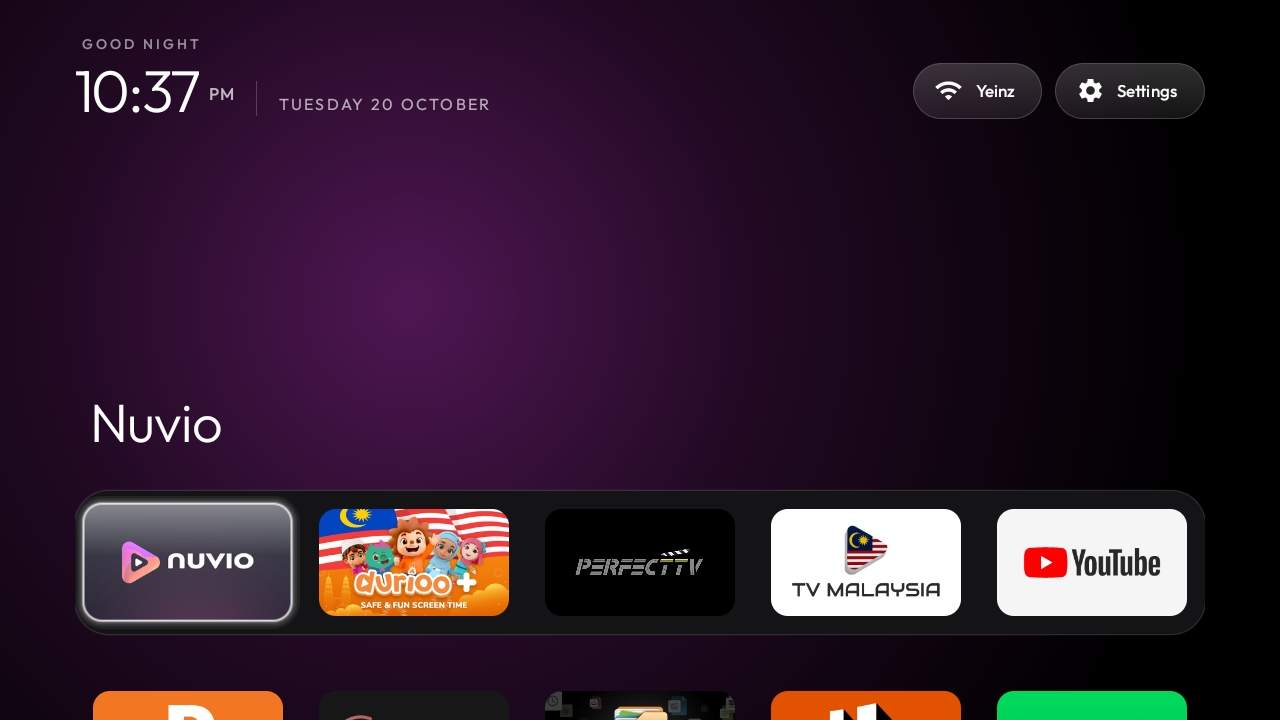 Same box, new home. Nothing on it that we didn't put there.
The one that almost got me
The trap I was warned about came up anyway. On Google TV, the setup wizard
(com.google.android.tungsten.setupwraith) can take over Home and crash-loop once the stock
launcher is disabled, so it has to be disabled too. But the Wi-Fi network saved during first setup
belongs to the wizard. Disable it and the TV forgets the Wi-Fi. And the Wi-Fi is the only way
you're talking to the TV. Oops.
The CleanYourTV script checks for this and skips the wizard until you forget the network and re-join it from Settings. I read that part of the troubleshooting doc twice. Okay, maybe three times.
Part 2: TV Guard, the part I wrote for us
A clean TV is nice. A TV that tells me what's going on is even better.
TV Guard is a small Android TV app (about 1,300 lines of plain Java) that sends what happens on the TV to my phone through my own Telegram bot:
- 📺 TV turned on (this one rings), plus what's on screen
- 📱 Opened <app> (silent)
- ▶️ What's playing: the YouTube video, show or song title, when the app reports it (silent)
- 💤 TV turned off, with how long it was on (silent)
There's no server and no port forwarding. The TV only makes outgoing connections to Telegram, so it works when I'm not home. It has no icon in the app list. It runs as two services that Android starts itself: an accessibility service (to see which app is in front) and a notification listener (only to read other apps' media sessions for titles, not the notifications themselves).
"Is the TV on?" turned out to be the hard question
I thought this would be one line. It took the longest of anything in the project.
Turning off the TV with its own remote does NOT put the box to sleep. The box keeps running with the screen awake and has no idea anything changed. The TV also ignores HDMI-CEC power queries, so I couldn't just ask it.
What does change is HDMI hot-plug. When the TV powers off, the HDMI connection drops, and Android
broadcasts AudioManager.ACTION_HDMI_AUDIO_PLUG. So "on" became box awake and HDMI plugged in. It
still needed debouncing, because HDMI flickers for about a second while the TV powers up, and
switching inputs causes a short drop:
/** "On" must hold this long before it is reported: HDMI bounces while a TV powers up. */
private static final long ON_SETTLE_MS = 4000;
/** "Off" must hold this long, so an HDMI blip or an input switch does not count. */
private static final long OFF_SETTLE_MS = 8000;
Claude and I found this by experiment: turn the TV off, read the logs, turn it back on, read them again. Repeat. No documentation would have told me how this particular box behaves. "Is the TV on?" isn't in any API. You find out by asking the box and watching what it does, the same way the macro pad's key-slot bug only showed up on the real device.
House rules, enforced by the TV
Once alerts worked, step two was rules. They're in one small XML file, so changing a number means rebuilding and reinstalling, nothing more:
| Rule | Value |
|---|---|
| Daily allowance | 60 minutes, resets at midnight |
| Counting | starts at the first app opened after the TV turns on, pauses while it's off |
| Bedtime | 19:00 to 06:00 |
| Warning | 5 minutes before a lock, on the TV and in Telegram |
When time runs out, a full-screen lock appears over everything, pauses playback and goes to Home. To get past it you need a PIN entered with the remote (▲▼ to change a digit, ◀▶ to move, OK). Five wrong tries means a one-minute lockout and a Telegram message to me. The PIN also turns on parent mode until the TV is turned off, so when we watch something together, it doesn't count against anyone's hour.
The kids are smart, so the Settings app asks for the PIN too. Without that, the obvious workaround is to go into Settings and switch the accessibility service off. (I know, because it's what I would do.)
From Telegram I get buttons: 📊 Status, ➕ 30 min, 🔒 Lock now, 🔓 Unlock, plus /add N and
/timer N ("lock in N minutes, whatever the other rules say"). Being able to tap "+30 min" from the
office when someone asks nicely has already been worth the whole project.
Small details that made it reliable
- Messages wait for Wi-Fi after the TV wakes and are retried for about 15 minutes. A late one gets "(at 7:42 PM)" added, so the timeline still makes sense.
- Only the "TV turned on" alert makes a sound. Everything else arrives silently, so my phone doesn't buzz every time someone changes the channel.
- Setup is one PowerShell command:
.\setup.ps1 -Port <port>. It asks for the bot token (hidden input), waits for me to press Start in the bot chat, then builds, installs and enables the app. The token goes into a gitignored file. After that, Wireless debugging goes off again.
One testing lesson: keys sent with adb shell input keyevent skip the accessibility key filter, so
the PIN screen can only be tested with the real remote. I spent more time on the couch pressing
arrow keys than I'd like to admit.
What's next
The plan for step three is a phone remote page, served by TV Guard on the home network:
- Type on the phone and the text appears in the TV's focused search box (accessibility
ACTION_SET_TEXT), so phone autocorrect, paste and voice typing all work. No more typing with arrow keys! - A D-pad, volume and app list, plus now playing with a seek bar through the media session.
- Shortcuts for the app in front, such as jumping straight to a movie in Nuvio with its
nuvio://imdb/<id>deep link. - Pairing with a code shown on the TV, so only our phones can use it. And it does nothing while the kids' lock is on, of course. Nice try.
Later ideas: different rules on weekends, per-app limits (YouTube 30 minutes within the hour), and an alert if someone manages to switch the service off.
So, was it worth it?
I moved fast because nothing was permanent. Packages were disabled, not removed, every change had a recorded undo, and the stock launcher was always one command away. Claude was quick, but the backup is what let me be quick too.
And a smart TV turns out to be just an Android box with a debug port and a vendor's opinions on top. Once I saw it that way, everything I know about building for Android applied. CleanYourTV had already solved the debloating and the launcher, and solved them well. That left me time for what only my house needed: knowing what's on the TV, and having it switch off at seven.
The TV is quieter now. The home screen shows five apps, my phone tells me when the TV comes on and what's playing, and at seven o'clock the TV locks itself.
I like it.
CleanYourTV is by Gathin and contributors, MIT licensed. If your Android TV is showing ads before your apps, try it, and if your model isn't listed yet, contribute your debloat list. TV Guard is a personal project for now. I may open-source it once step three is done.