In this article
Postman was the first tool I ever used to test an API. To be honest, I never got along with curl in the terminal, so Postman made my job easy. I still use it every working day: my own backends, clients' APIs, and whatever is broken that morning.
Then they put team collaboration behind a paywall. A freaking paywall. Sharing a collection with two colleagues now means a paid plan.
I mean, it's a dev tool, and most devs hate paying for tools. But then again, I'm a dev myself and I used to run a business, so I get it. The Postman team needs to pay the bills and their salaries. I still don't like it.
There's other stuff that has been bugging me for years too:
- It's an Electron app, so it ships its own copy of Chrome. It's big and slow to start.
- It wants me logged in to a cloud account to do normal things.
So Rustman was born out of my empty wallet. I didn't know where to start until I stumbled on REA, an awesome repo from the community that tells Claude how to reverse-engineer a piece of software and make your own version of it. There I was, thinking: what if I make my own Postman, but in Rust? Then I can call it Rustman!
Ah, my naive mind thought this would be an easy job. Alone, it would take me weeks, months, maybe a year. I'm good with backend, but frontend not so much. I can see in my head what I want, but when it's time to turn it into UI and UX, my mind goes blank. So Claude Code helps me with the frontend while I do the backend.
You must be wondering, why Rust? I mean, why not Rust? I spent half a year learning it, and it didn't make sense NOT to use it. Rustman is the first project I wanted to use it for.
It's MIT licensed, and the code is on GitLab.
GitLab repositoryhazrien.nazman / RustmanA lightweight Postman alternative in Rust + Tauri. Plain files, git sync, no login, ~3 MB.
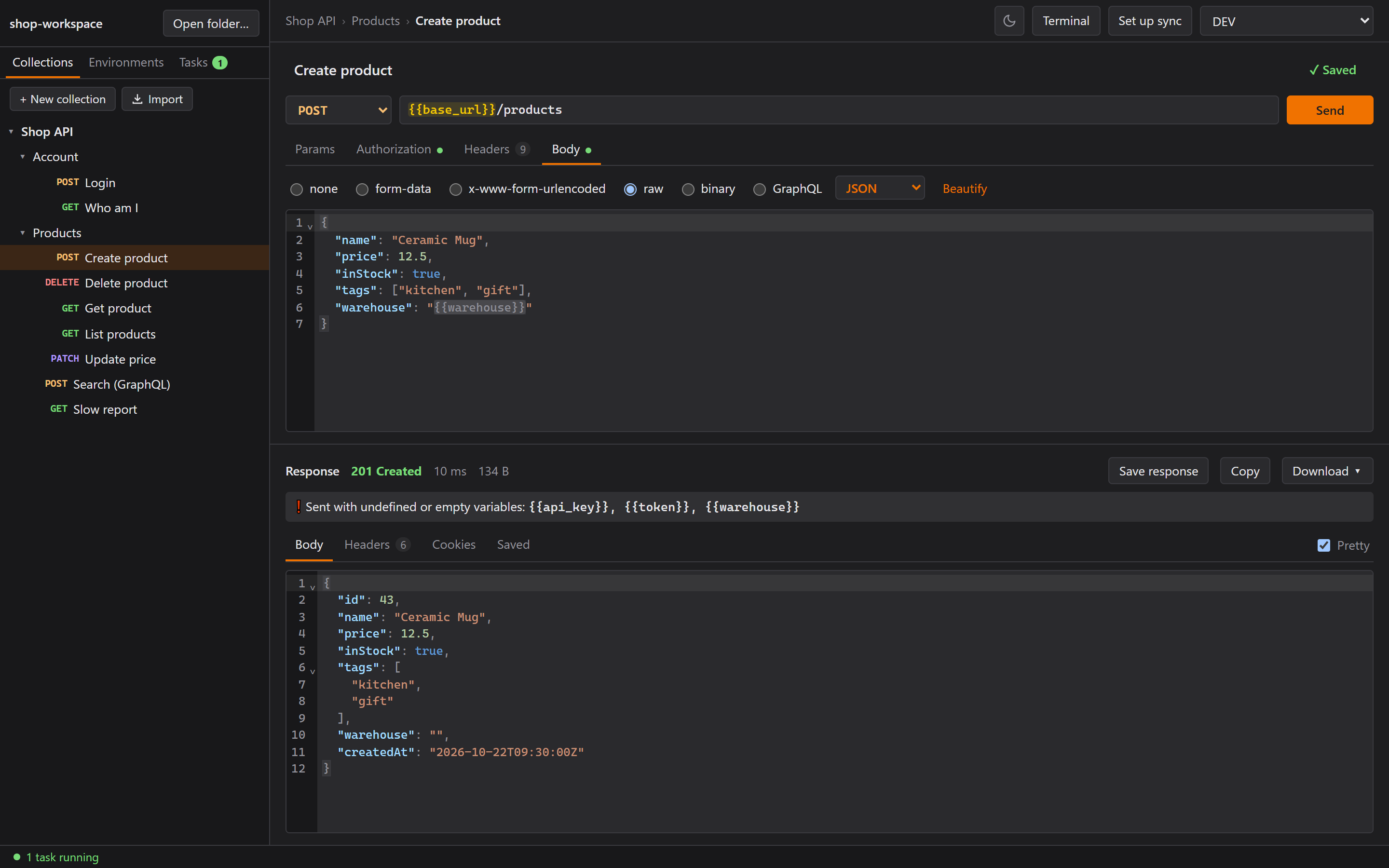
Rustman 0.5, two days in. The demo "Shop API" workspace runs against a local mock server.
This is a series. Part 1 (this one) is the idea and the foundation. Part 2 is the built-in terminal and Windows being Windows. Part 3 is team sync without a server. Part 4 is all the small things that make an app feel right.
The rules I set on day one
Before writing any code, I wrote down what Rustman is not:
- No login, no cloud, no telemetry, no built-in AI. Nothing leaves your machine except the requests you send.
- Everything is a plain file in a folder you pick. If the folder is in git, you get history, diffs, branches and sharing for free. OneDrive or Syncthing works too.
- Small and fast. The goal was an installer of 10 to 20 MB.
The stack
Like cooking, you pick your ingredients first:
- Tauri v2 instead of Electron. Tauri uses the WebView2 that's already part of Windows, so there's no bundled Chromium and no bundled Node.
- Rust for everything that touches the disk or the network.
- Svelte 5 + TypeScript for the UI, with CodeMirror 6 for the editors.
- TOML, one file per request, so a git diff shows exactly what changed.
A request file only holds what you set:
name = "Create invoice"
method = "POST"
url = "{{base_url}}/invoices?draft=true"

[auth]
type = "bearer"
token = "{{token}}"

[body]
type = "json"
content = '{ "amount": 10 }'
The first thing I did with Claude was write a CLAUDE.md with the project, the stack, the file
format and the roadmap. Every session starts with the same context, so I never have to explain the
project twice. If you treat Claude like your other half, things go smoothly. The key is one step at
a time. I also kept a build journal from the first hour, which is where these articles come from.
Milestone 1: a request you can't edit
The first milestone was the boring part: open a folder, show a tree of collections and folders, and edit a request. A few decisions from that first hour stuck:
- File names are slugs of the display name (
Create Invoice!→create-invoice.toml), and duplicates get-2,-3instead of overwriting. - The UI only sends paths relative to the workspace. Rust rejects
..and absolute paths, and only deletes insidecollections/. collections/is only created when you add the first collection, so opening the wrong folder by mistake leaves nothing behind.
Then I tested it by hand, and this is where the ups and downs with Claude started. First of all, Claude doesn't have eyes. And its sense of UX is very terrible. UX stands for User Experience. It's for the USER, not the AI (maybe for AI the correct term should be MCP? AX? Okay, I'm getting sidetracked). So every now and then I had to stop my backend coding just to check Claude's UI, take notes, and tell it what worked and what didn't.
My first note: "I can create a request but can't edit it. There's no place to put the URL."
Claude's workaround for having no eyes: it started the app with WebView2's remote debugging port on and drove the UI from a Node script over the Chrome DevTools Protocol. Clicking the request reproduced the bug straight away:
TypeError: Cannot read properties of undefined (reading 'filter')
The cause was a nice one. To keep the TOML files tidy, Rust was told to leave out empty fields when
saving (serde's skip_serializing_if). But serde uses the same attributes when it sends data to
the UI as JSON. So a brand-new request reached the editor with no headers field at all, and the
editor crashed trying to filter it.
One set of serde attributes was serving two formats, so trimming for the file also changed the API. The fix was to stop trimming with attributes and trim when writing the file instead. The UI now always gets every field, and a new request on disk is still just:
name = "Ping"
method = "GET"
That DevTools-over-a-script trick became how we tested everything for the rest of the project. Claude can't click a window, but it can drive the real app through the same protocol Chrome's DevTools use, which is the closest thing it has to eyes.
Variables you can actually see
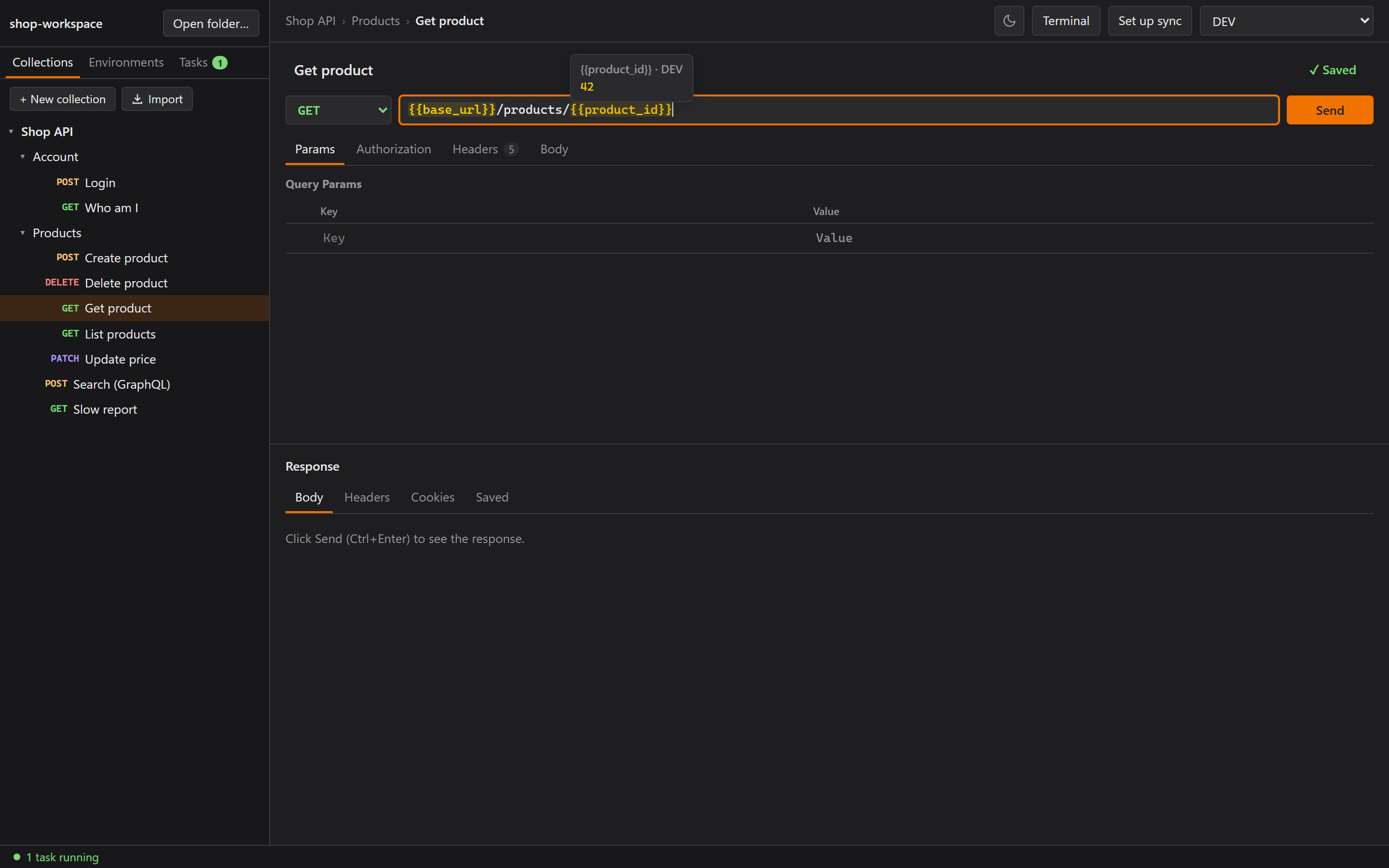
In Postman, {{base_url}} is just text until you send. I wanted to see at a glance whether a
variable has a value:
- Gold means it has a value. Grey means it's empty or not defined.
- Hover shows the value, or a ❗ warning.
- Typing
{{pops up the environment's variables. - A variable can have a tag (URL, Params, Headers, Auth, Body), and tagged ones come first in that
field's suggestions. Type
{{in the URL andbase_urlis at the top.
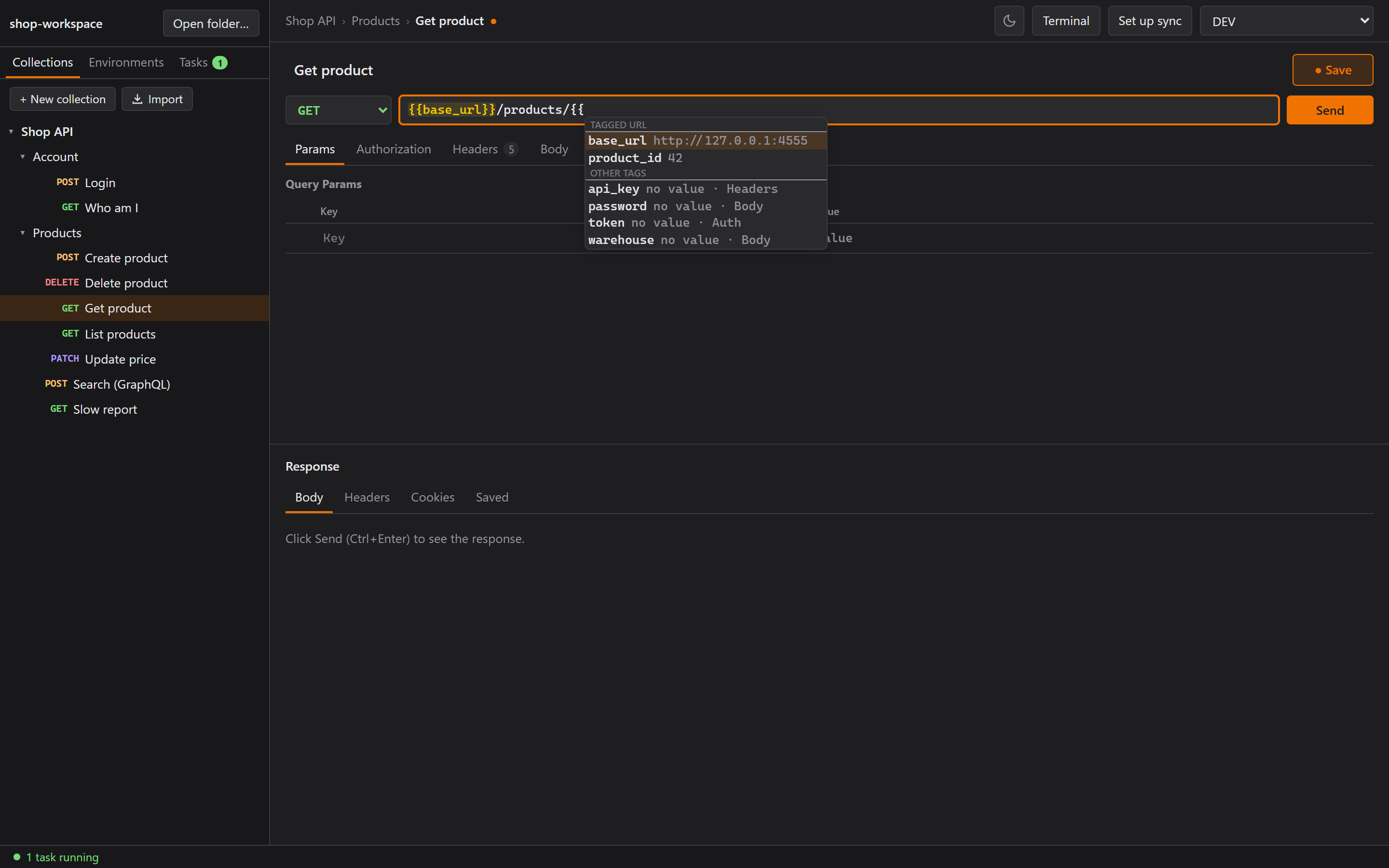 Variables tagged for the field you're typing in come first.
The catch: a normal HTML <input> can't color part of its text. So every field that can hold a
variable (the URL, every param and header value, auth, the body) became a tiny one-line CodeMirror
editor. Overkill? Maybe. But I like it.
The popup that never opened
Colors worked. Hover worked. The {{ popup never appeared.
Claude loaded the page's own CodeMirror modules over DevTools, found the live editor, and ran the suggestion lookup by hand. It returned the right variables in the right order, but the popup's state stayed at "pending" forever.
The reason: CodeMirror identifies a suggestion source by the function object itself. Our code created a new function on every lookup, so every update looked like a brand-new source and the finished results were thrown away. The fix was one line (yes, ONE line): create the function once per field.
On the way there we ruled out a lot of things that looked plausible: window focus, two copies of CodeMirror's packages, paused animation frames. None of them mattered. To be honest, that's what most debugging is.
Secrets that stay out of git
If collections live in git, tokens can't. So any environment variable can be marked secret. Its
value goes into dev.secrets.toml next to the environment, and Rustman adds that pattern to the
workspace's .gitignore by itself. The variable name is shared with the team, and the value never
leaves your computer. (Remember this one. In Part 2 I push a password to GitLab anyway.)
Milestone 2: Send, and saved responses
Sending is in Rust (reqwest with rustls, gzip/brotli, and the Windows system proxy). It fills in
variables, builds every body type Postman has (form-data with files, urlencoded, raw, binary,
GraphQL), adds the same automatic headers Postman adds, and turns network errors into something
readable instead of a crash:
Couldn't connect to the server. • No connection could be made because the target machine actively refused it. (os error 10061)
Then saved responses. One click keeps the response. A Saved tab lists them, you can view one again
or delete it, and each one is just a file under responses/. (Funny thing: Postman has this too. I
never used it, eh, I never even noticed it until I started building Rustman lol.)
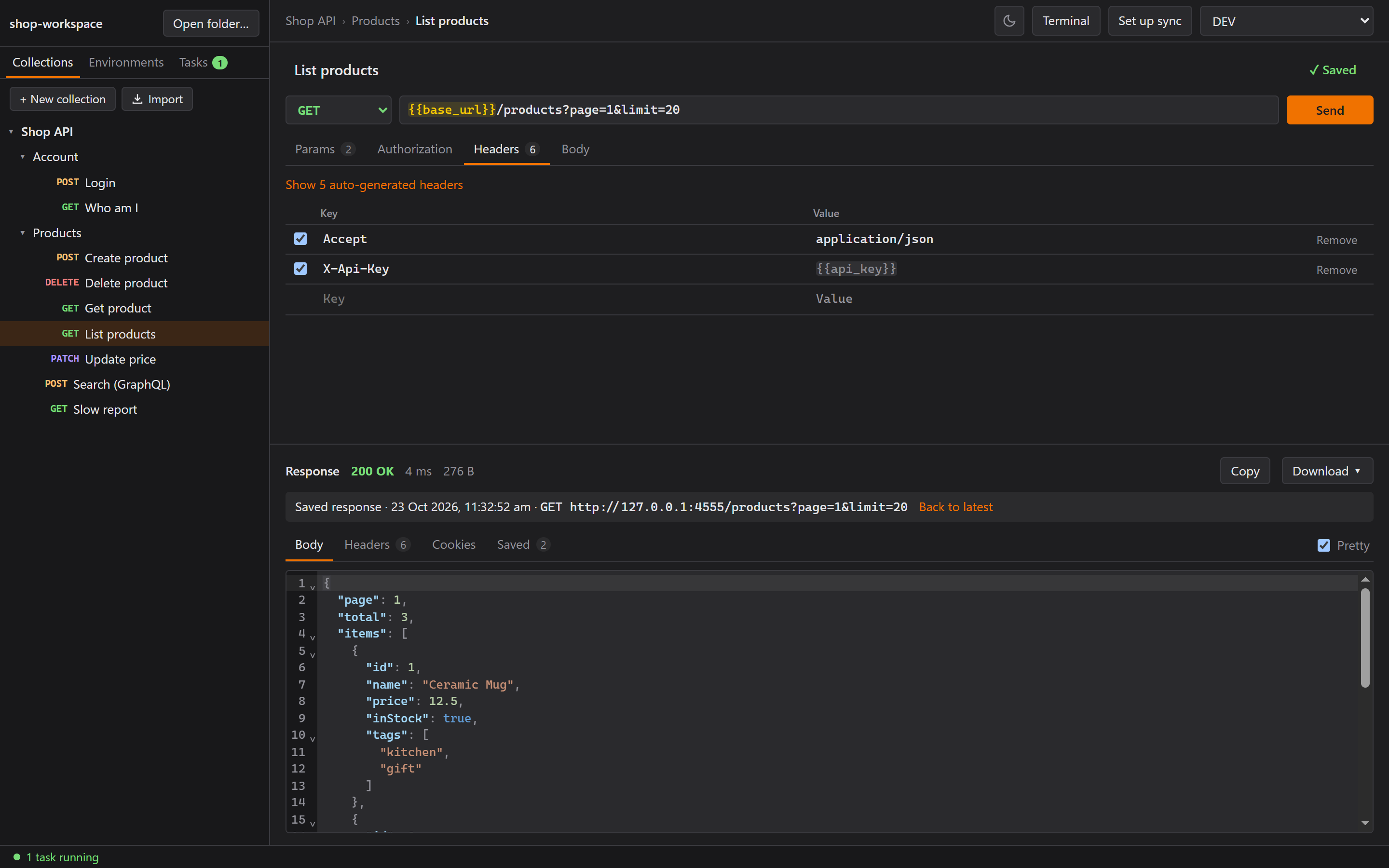
Testing it found something important: a saved response can contain an echoed secret token. So
responses/ is gitignored by default. You can still commit them, but you have to choose to.
Fun fact from the same testing: on Windows, connecting to a closed localhost port takes about 2 seconds to fail (we measured 2,081 ms), because Windows retries before saying "refused". That's why Cancel was next on the list.
Cookies, found against my own backend
Then I pointed Rustman at this website's API. {{backend}}/auth/login worked. {{backend}}/auth/me
right after said "not signed in".
Rustman had no cookie jar. Postman keeps one automatically, so I never even thought about it (skill issue, I know). The session cookie from the login was never sent back.
The fix was to turn on reqwest's cookie feature and give the shared client a jar. Now:
- Cookies a site sets are sent back to it, like in Postman.
- A
Cookieheader you add yourself wins over the jar. - A Cookies tab shows what the response set and what Rustman sent, so when auth breaks, you can see why.
- Clear all cookies throws away the jar and starts fresh. That's the simplest way to "log out", because reqwest's jar can't list or delete single cookies.
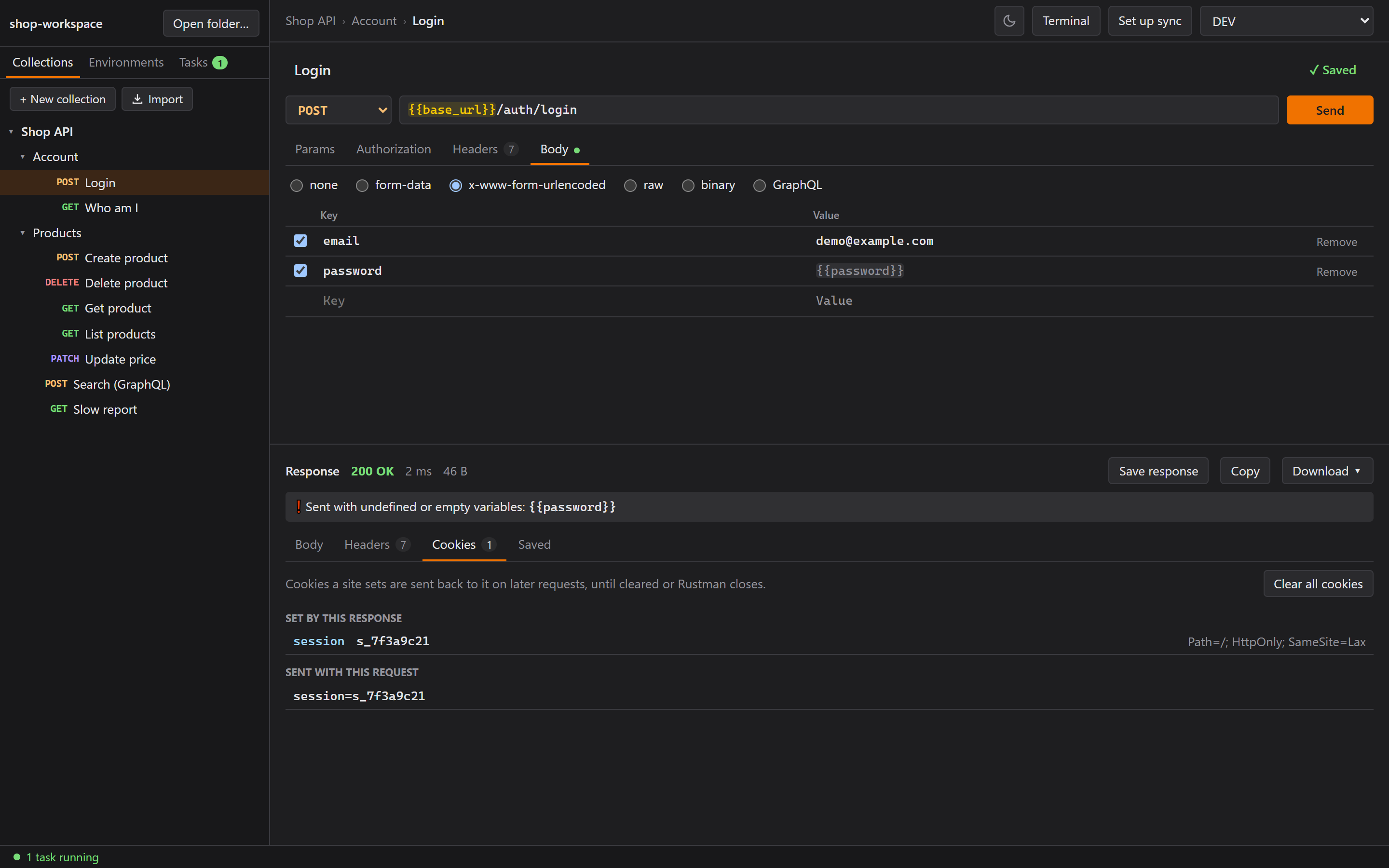
A Rust test replays the exact flow against a tiny local server: "login" replies with
Set-Cookie: sid=abc123, and "me" must arrive with Cookie: sid=abc123.
So, how big is it?
When I built the first installer for my laptop, it came out at 3.2 MB. The MSI is 4.3 MB. The goal was 10 to 20 MB! The laptop needed nothing else, no Rust and no Node, just that one file. If anyone asks me why Tauri, I'll just show them that number.
Where Part 1 leaves me
Two days in, Rustman sends requests, keeps cookies, saves responses and fits in 3.2 MB. Writing down what it's not on day one ("no login, no cloud, plain files") answered a dozen questions before they came up: where secrets go, what's gitignored, and why sync could later work without a server. Saved responses took one afternoon.
In Part 2, I ask for a terminal inside Rustman, and
Windows teaches me about pseudo-consoles, keystrokes arriving out of order, and a bash.exe that
isn't the bash I wanted.
p/s: REA is the community's answer to the big companies. They use AI to replace us, we use AI to replace them!!